
Home / Buying guide
Mulebuy buying guide: compare the payable total, not the crossed-out price
A discount is useful only if the right variant is still available and the complete purchase fits your budget. Follow the two-payment agent process and record where a price can change between the listing, purchase and parcel stages.
Illustrated archive: these screens document Mulebuy’s earlier buying flow. They do not confirm current operation, prices, return terms or route availability. Verify the service and its terms before sending money or identity documents.
1. Find the original seller link
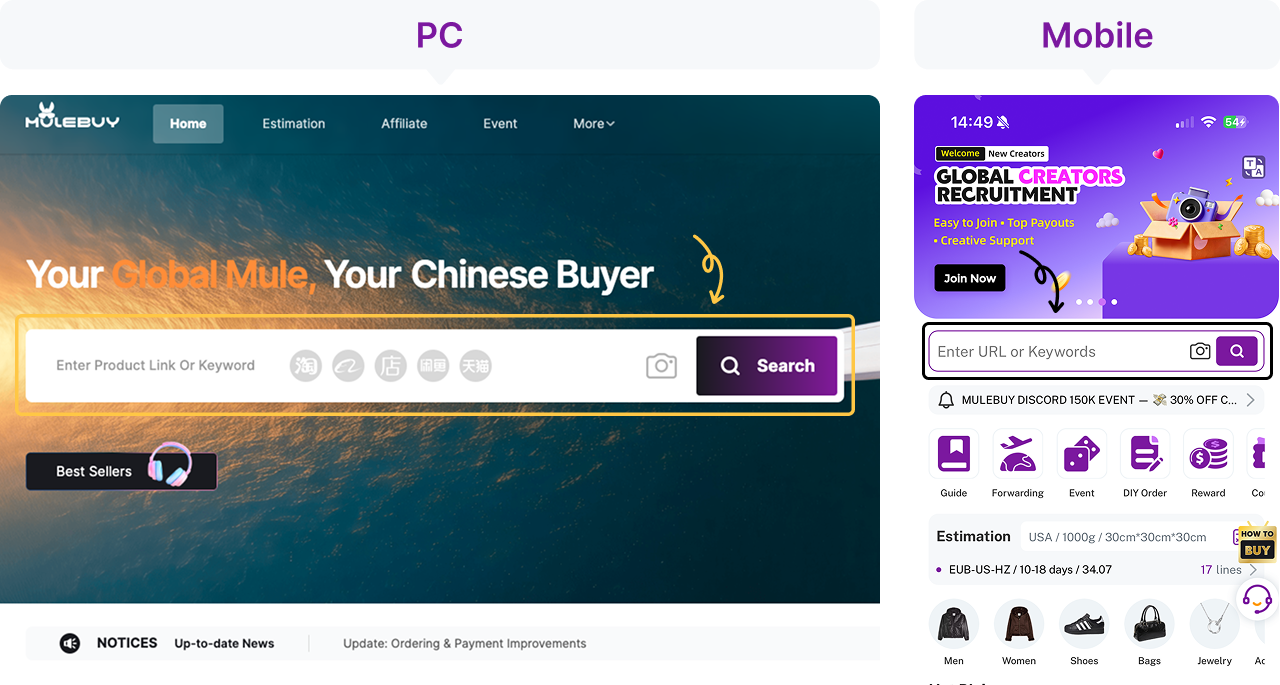
Search for the product or paste its seller URL into the agent search field. Keep the original Taobao, Tmall or Weidian link with your notes: an agent-wrapped link or a screenshot alone may not identify the exact listing. If a link fails to import, ask the verified support channel whether manual ordering is available instead of selecting a similar-looking item.
Record the displayed price with the date, seller and exact variant. A thumbnail’s lowest starting price may belong to a different size or quantity.
2. Choose the exact variant and make the first payment
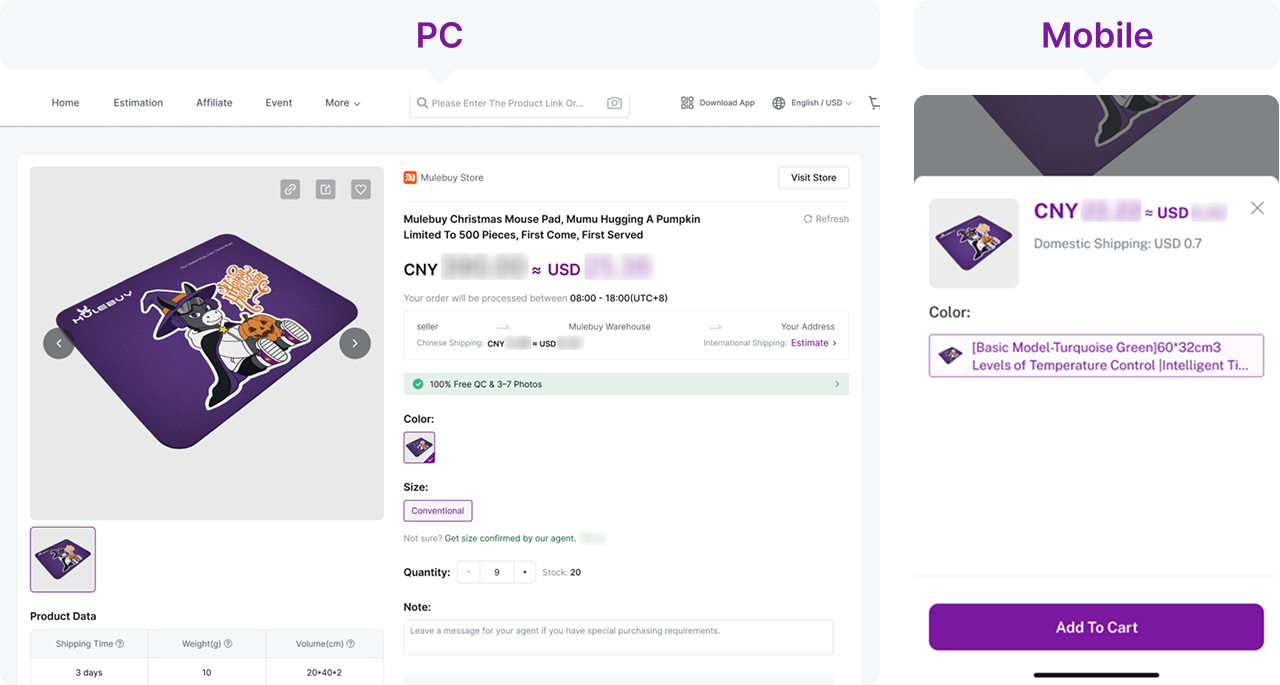
Check colour, size, quantity, measurements and seller notes before adding the item to the cart. Review the order quote for goods, domestic delivery and any disclosed service charges. A wallet top-up is not necessarily an order payment; confirm the order itself shows the expected status. International parcel freight is a later decision.
Check whether the offer depends on a coupon, minimum spend or buyer eligibility. The amount your agent can actually purchase at is the figure to approve.
3. Follow the purchase and domestic delivery
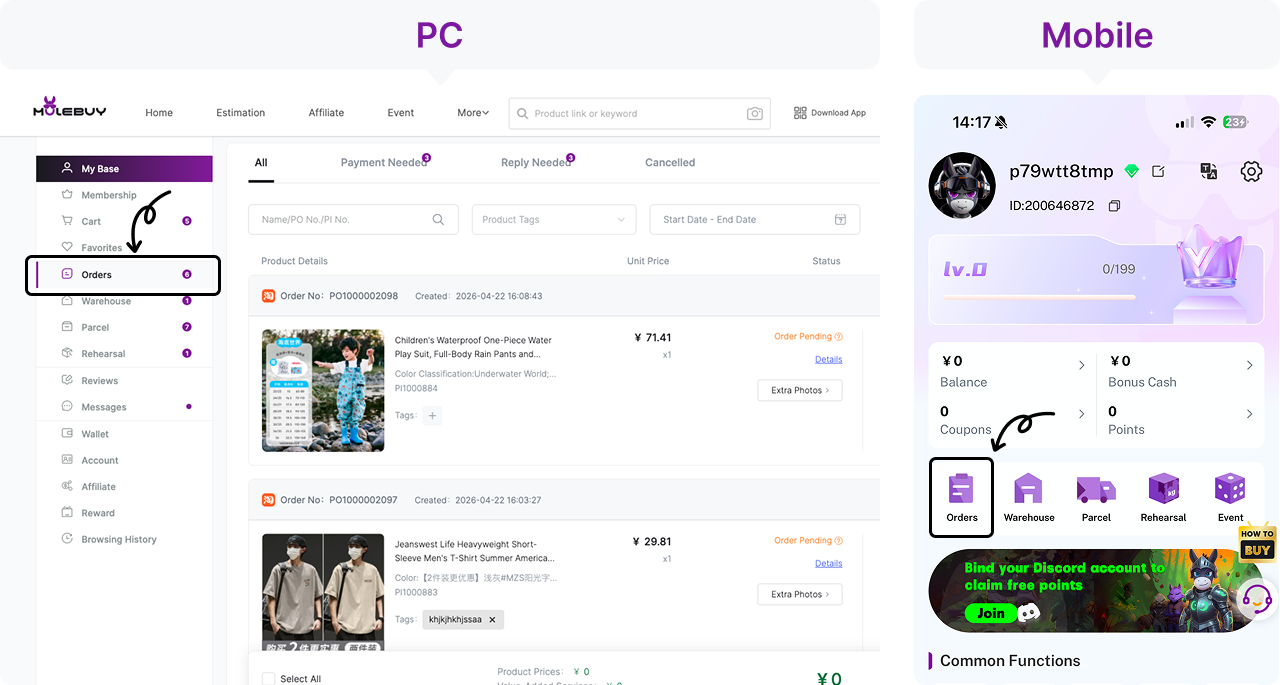
Open the order record and distinguish waiting for payment, agent purchasing, seller dispatch and warehouse arrival. Reply promptly if the agent requests a price difference or a missing option. Domestic tracking follows the seller-to-warehouse leg; it is not proof that the international parcel has shipped. Save the order identifier when asking for help.
If the price changes before purchase, ask for the new item and domestic-delivery amounts separately. Update your comparison instead of treating an earlier screenshot as a guaranteed reservation.
4. Inspect warehouse QC before deciding to ship
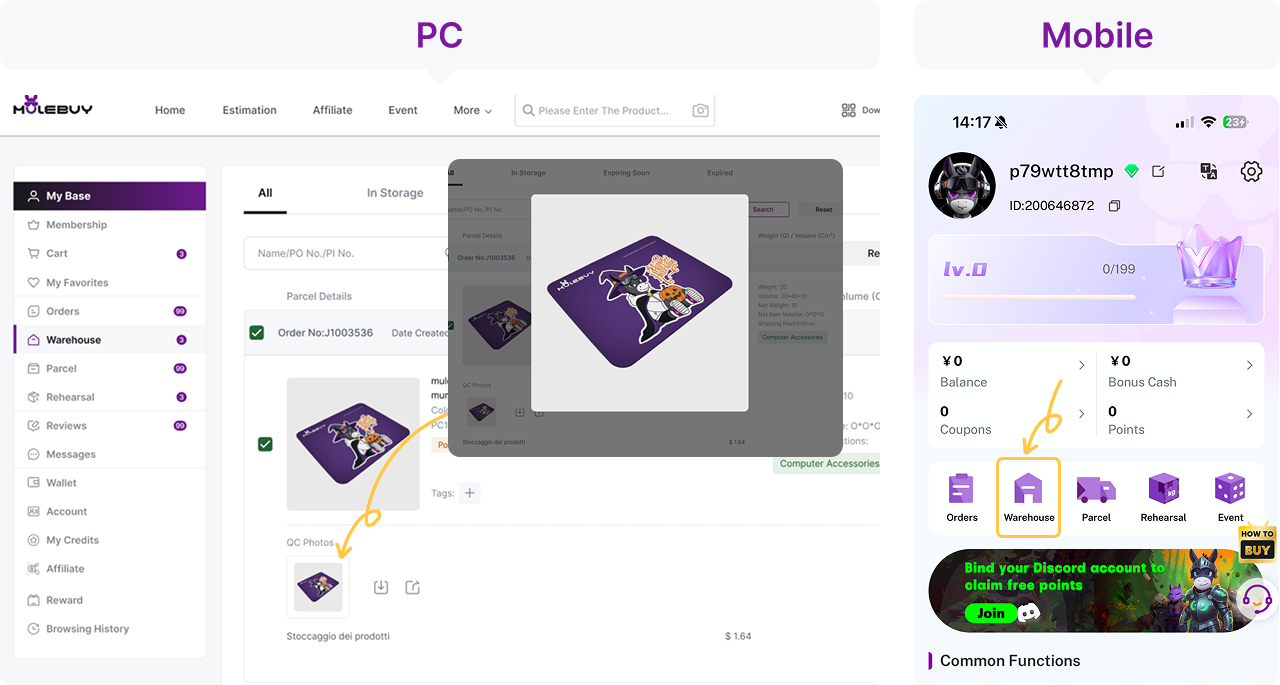
Compare the received item with your saved variant, then open the full-size photos. Check visible colour, labels, measurements, print and damage relevant to the purchase. Request a specific additional angle or ruler measurement when the default photos cannot answer your question. QC photographs are visual evidence, not authentication, a laboratory test or proof of durability. Ask about seller return conditions before the applicable deadline.
A discounted item still needs the same variant and visible-condition checks. Ask about the seller’s applicable return conditions rather than assuming that a sale label always removes or always preserves a return option.
5. Build the parcel and review international freight
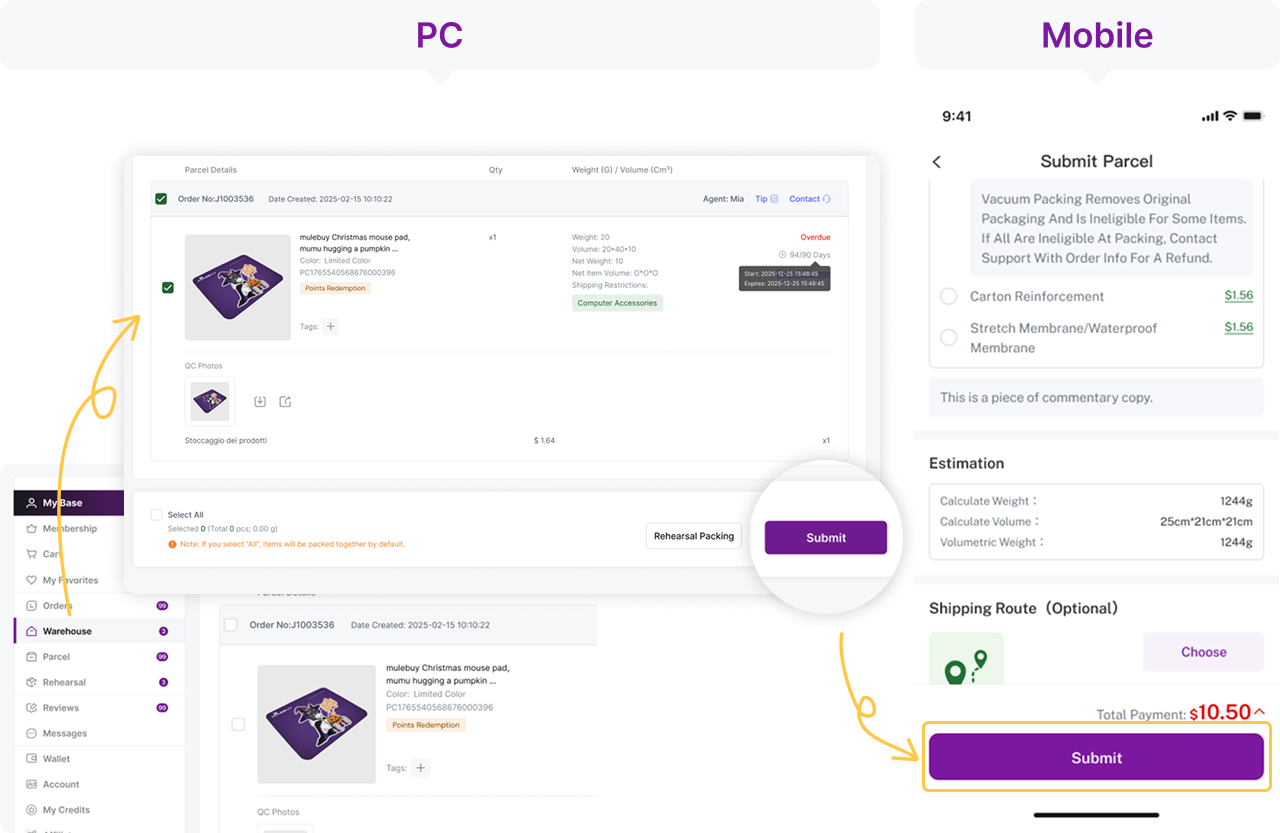
Select eligible warehouse items, destination and packing preferences. Rehearsal or pre-calculation may help establish packed dimensions and weight where offered. Compare the available route, chargeable weight, restrictions, selected services and any applicable import costs before paying. Keep protective packaging that the product needs; a lighter parcel is not useful if it arrives damaged.
Compare the packed total with the budget you set before buying. Removing a low-cost box or combining items can alter dimensions and protection, so assess the actual quote instead of assuming a fixed saving.
6. Track the parcel from its own record
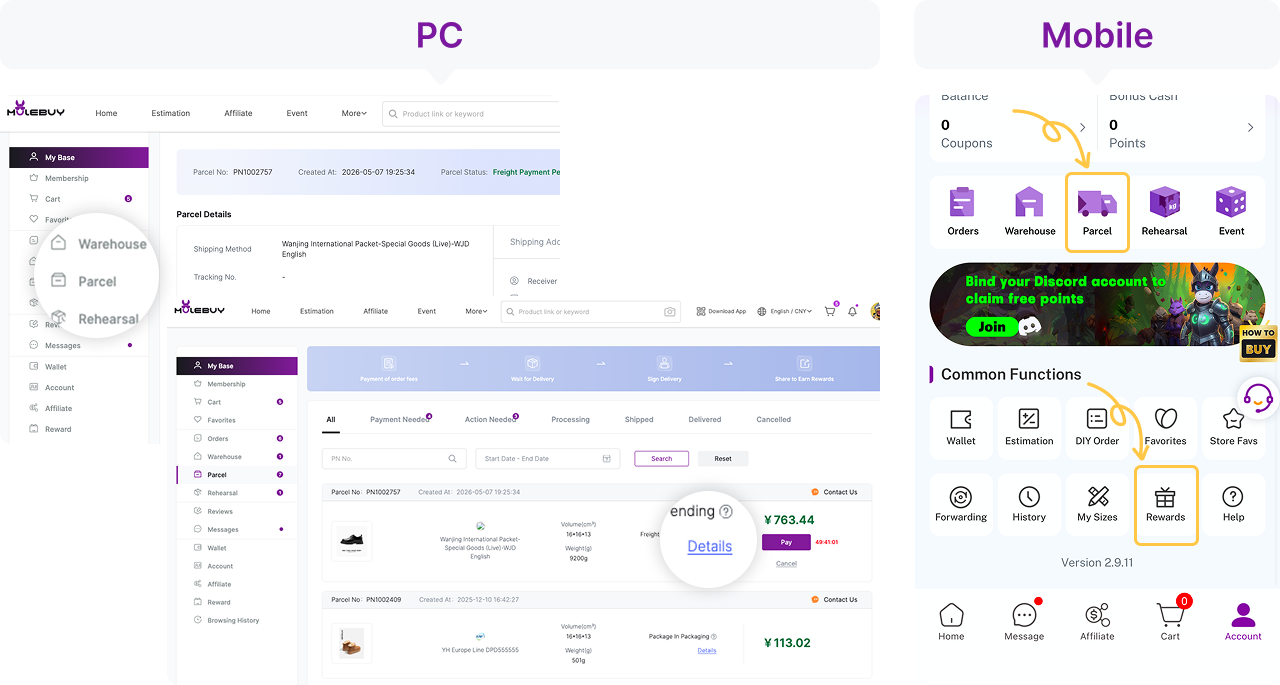
Open the parcel details after submitting it and confirm freight payment and dispatch status. Save the international tracking number and check the carrier events. A parcel record can exist before it is paid or handed to the carrier. If there is a problem, provide the parcel identifier and relevant event to the support channel responsible for that stage.
Keep the final paid order and parcel amounts alongside your recorded prices. That lets you compare the real cost of this purchase without confusing an advertised reduction with a delivered saving.
Worked example: two reduced hoodies from different sellers
For each hoodie, record the selected size, the live item price and domestic delivery. Do not compare a small-size starting price with an extra-large variant that costs more. If the agent reports a seller price change, review the new total before authorising it. At the warehouse, compare the actual label and measurements with your order. Combining the two items may change the parcel dimensions or route options, so request the real parcel quote rather than assuming that one international payment must be cheaper. Keep the final quote alongside the price history.
- Are both prices for the same variant and quantity?
- Does the discount require a coupon, minimum spend or specific buyer status?
- Has the seller price changed before the agent purchased?
- Does the parcel quote use actual or volumetric weight?
Two payments and a quote to check at each stage
The first payment concerns the goods, domestic delivery and any disclosed services. The later parcel payment concerns international freight and selected packing or other services. A wallet top-up, an order payment and a parcel payment are different records: check which one you completed.
Chargeable weight can depend on actual weight or parcel volume under the selected route’s rules. An early estimate is not a guaranteed final quote. Check current restrictions, insurance terms, warehouse storage conditions and return or exchange deadlines; do not infer them from the figures in these old screens.
Practical questions
Is a crossed-out price proof of a saving?
Not by itself. Check what the comparison figure represents and compare the same variant at the same seller. A price history you recorded can help, but a few observations do not prove every price charged during a period.
Can I use one shipping estimate for every item?
No. Route availability, destination, package dimensions and item restrictions affect the quote. Treat an estimate as provisional until the packed parcel is measured and the service is selected.
What if the agent asks for a price difference?
Compare the new quote with the exact variant you requested. Ask what changed and whether the order can still be cancelled before purchase. Do not assume the directory price was a guaranteed reservation.
Decision points for the whole order
Freeze the comparison before deciding that a price is a deal
Save the seller, exact variant, quantity and time of the price observation. A lower “from” price may belong to a different size or bundle. If an old Mulebuy link fails, recover the original marketplace listing and confirm that same combination with a compatible agent. A new link that uses the same photograph does not preserve the price history or prove the same stock.
Our home and fee-page requests to Mulebuy timed out on 22 October 2026; a failed access check cannot tell us why or whether a particular parcel will arrive. Before treating an old offer as actionable, verify the current buying route, support access and quote. The Look-back chart is a record of observations you enter, not a feed of live prices or completed sales.
Compare landed baskets, not two crossed-out numbers
Put the quoted purchase price, domestic delivery and disclosed buying charges in the first-payment column. Put international freight, packing and optional services in the later-parcel column. Keep payment conversion and any insurance, tax, clearance or carrier charges visible. A coupon that reduces only goods cost may leave the total almost unchanged.
Made-up comparison: seller A asks CNY 120 plus 20 domestic delivery; seller B asks 135 plus 5. Both reach 140 before buying fees and international transport. If A requires an additional paid measurement or a larger retail box, the lower item price can lead to the higher total. Do not enter these invented amounts into your price history as observations.
Record the actual CNY wallet credit and final payment debit, not just the public exchange rate. Ask whether a coupon has a threshold, expiry, product exclusion or limited freight use, and whether the basket still qualifies after a refund. The August fee archive and old banners explain historical offers only; they do not confirm a discount at today’s checkout.
When a price-difference request breaks the original comparison
Open the saved variant and compare it with the agent’s request: did the seller change the price, did the selected size cost more, or did domestic freight change? Ask for the current total and reason before approving the difference. Preserve the dated original observation, but do not assume it binds a seller to an expired offer.
If the sale item is unavailable, treat a substitute as a fresh buying decision. Check material, size, seller, price and return eligibility; a similar photo is not an equivalent deal. If the seller has not dispatched, ask whether cancellation is still available. When domestic tracking says delivered but the warehouse item is missing, request matching using the item and tracking IDs—delivery is not yet completed QC.
Decide whether the discounted item is the item you compared
Compare quantity, label, colour and visible condition against the saved discounted variant. For a “two pieces” offer, count the actual contents. For reduced footwear or clothing, ask for the particular mark, seam or measurement that could explain the lower price. A general front view cannot establish that an unseen defect is absent.
If the decisive detail is missing, request a named view and confirm its charge. The August help described basic fixed-angle QC and CNY 1.5 extra photos; these were historical terms, not a current offer. Set the extra evidence cost beside the remaining saving, but do not approve an unexplained defect simply to preserve a bargain.
A low price and several positive GL comments do not prove authenticity, chemical safety or durability. GL/RL are community opinions, not formal agent instructions. When the received variant differs or the photo stays unreadable, hold dispatch and ask about the applicable return process while the item is still in the warehouse.
Calculate the net remedy as well as the claimed saving
Ask whether the discounted item has a seller-specific exclusion and whether the proposed return is for a mismatch or a change of mind. State the selected variant, actual Stored time, discrepancy and remedy. Keep tags and packaging intact; an apparent bargain is not a reason to waive a question that would decide the purchase.
The return policy archived on 23 August 2026 described a request within five days / 120 hours from Stored, subject to seller acceptance and resale condition. Custom goods and some removed-label or packaging cases were excluded. This describes the archive, not a current guarantee. Confirm eligibility and the full deduction before choosing return, replacement or shipment.
For personal-reason returns, that archive listed USD 0.75 service cost plus relevant domestic freight. An item-price refund may therefore be smaller than the original debit; ask how any coupon or bundle adjustment is handled rather than assuming it is restored. Track the accepted return, wallet credit and withdrawal separately. If no response is available, retain the transaction and contact evidence for the payment provider’s applicable process.
A freight threshold can erase a goods discount
Ask for the packed weight and dimensions of the final basket. A large shoe box or bulky jacket may cross a line’s next rounding step even when its item price falls. Compare the complete measured freight quote with the saving; do not assume the agent’s early estimated weight is the final chargeable weight.
Illustrative split decision: one accepted parcel costs CNY 220; splitting it gives quotes of 130 and 125. The split adds 35 before any extra packing or arrival charges. It can still be necessary for a restriction, but it is not automatically cheaper. Check both lines’ destinations, permitted goods, size limits, compensation and declaration requirements. If no line appears, obtain the actual rejection reason instead of disguising the contents.
Waiting for another sale can also consume storage time. The August archive described 90 free days from Stored and paid extensions. Check each item’s own countdown and the extension cost before delaying consolidation; the older item can expire while you wait for the newer bargain. The pictured Overdue state does not confirm recovery is possible.
Keep delivery evidence separate from the price-history chart
The chart answers what prices you observed. For a parcel, use the order and carrier records: payment, dispatch, collection and delivery scans. A label-created event is not carrier collection, and an agent’s “in transit” wording is not proof of delivery. Save both systems’ dated events if they disagree and ask for the next verifiable handover.
At arrival, check the quantity and variant that qualified for the offer. Keep packaging, label and clear photos if the delivered bundle is short or damaged. Report the specific mismatch promptly according to the applicable terms; the crossed-out price alone does not establish the value of a loss or the compensation due.
A focused request reads: “Order [ID], offer recorded [date], selected [variant/quantity], amount paid [currency/amount]. Received [specific difference]. Attached are the selected offer and received contents. Please confirm the remedy, deductions and deadline.” Keep original payment records private and remove personal details from any public price-comparison example.
A reduced jacket with a changed checkout price
Save dated prices for the same seller, size, colour and quantity. If the agent requests a price difference, compare the current variant with that record before authorising it; a lower headline price may be for another option. Add domestic delivery, conversion and parcel costs before judging the saving. The look-back chart only plots your observations: it cannot see completed sales or prices between visits.
Historical sources and the current access limit
The policy detail above comes from official pages archived on 23 August 2026. These links identify the original pages; they may be unavailable. The six interface images are historical documentation, not our order, a current price list or proof of a successful shipment.
- Buying Guide — 2026-08-23
- Quality Check — 2026-08-23
- Services Fee — 2026-08-23
- Return & Refund — 2026-08-23
- Top-up & Withdrawal — 2026-08-23
- Weight Description — 2026-08-23
- Storage Management — 2026-08-23
- Shipping — 2026-08-23